Pixel UI Kit Sample (Godot 4 / Ren'Py)
A downloadable asset pack
PIXEL UI KIT — SAMPLE (FREE)
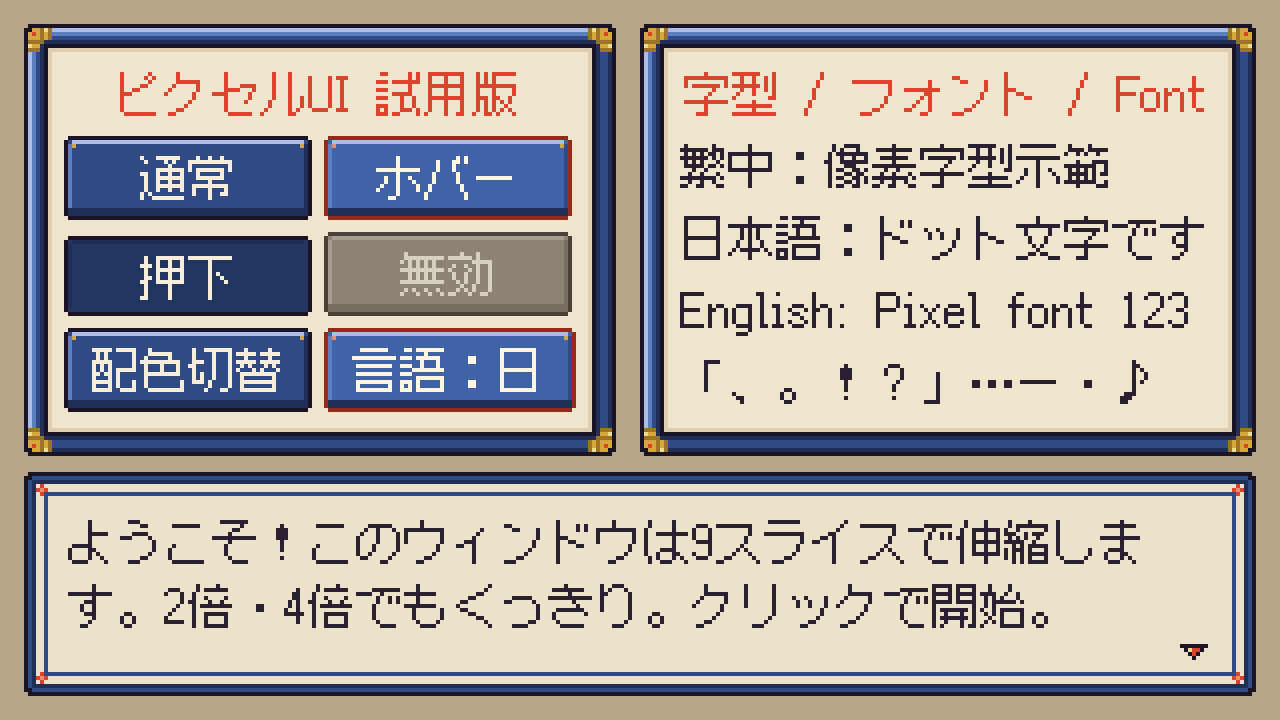
A free sample of a pixel-art UI kit for Godot 4 and Ren'Py. Every image is drawn by code, the 9-slice margins are already measured for you, and it comes with a Traditional Chinese / Japanese pixel-font demo.
WHAT'S INSIDE
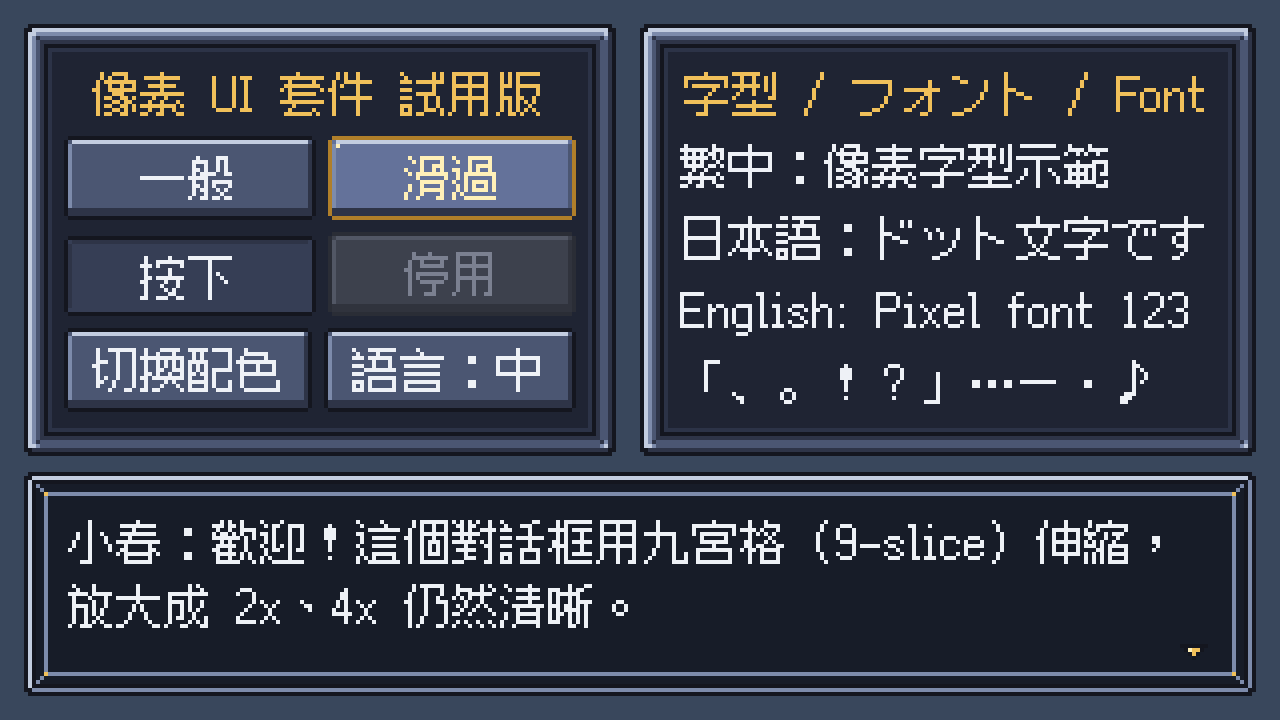
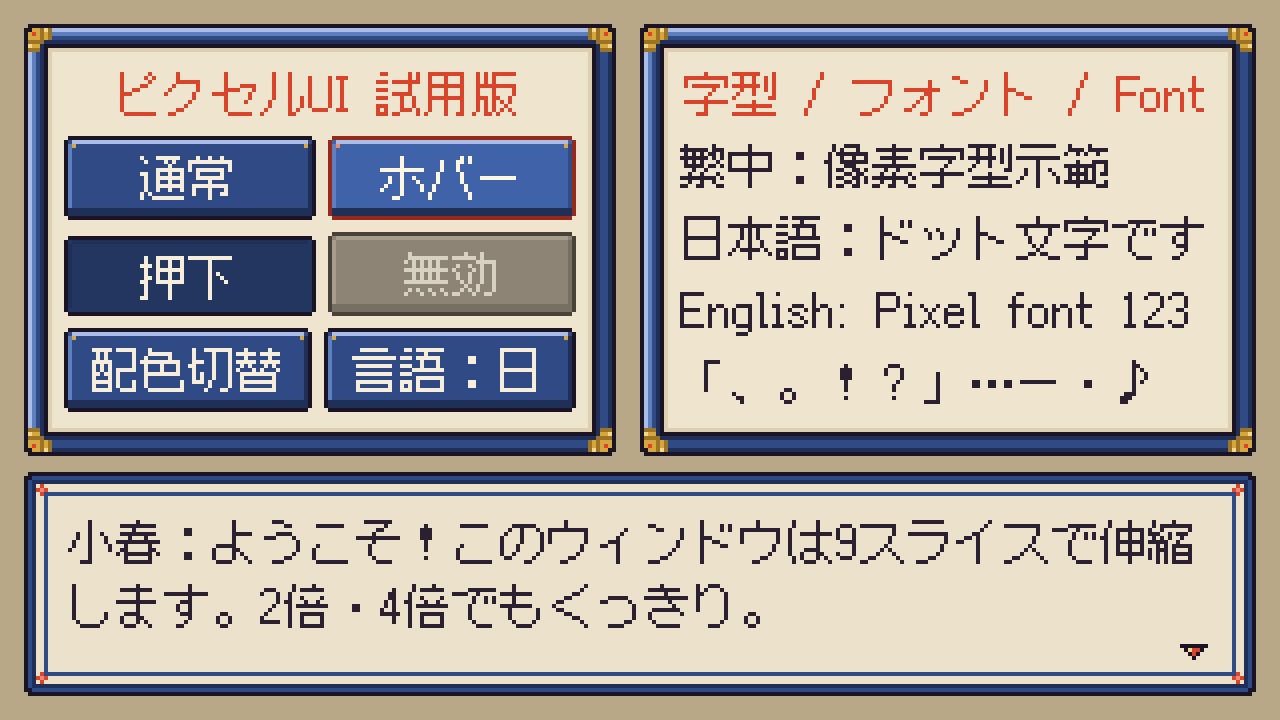
- 8 UI images in 2 palettes (Neutral, and Wafu, a Japanese-style palette): window frame, button in 4 states (normal / hover / pressed / disabled), focus frame, dialogue box and next-page arrow.
- Native 1x PNGs (the actual assets), plus 2x and 4x nearest-neighbor previews and 9-slice preview sheets.
- 9-slice data in assets/slices.json: fixed border, text padding and expand margins for every image, in [left, top, right, bottom] order. No slicing needed on your side. The README has the same table.
- Godot 4 Theme: theme_neutral.tres and theme_wafu.tres (StyleBoxTexture), with type variations such as DialogueBox, LabelTitle, LabelDialogue and ButtonJA. They come in a small Godot 4.3 project with a demo scene that switches palette and language.
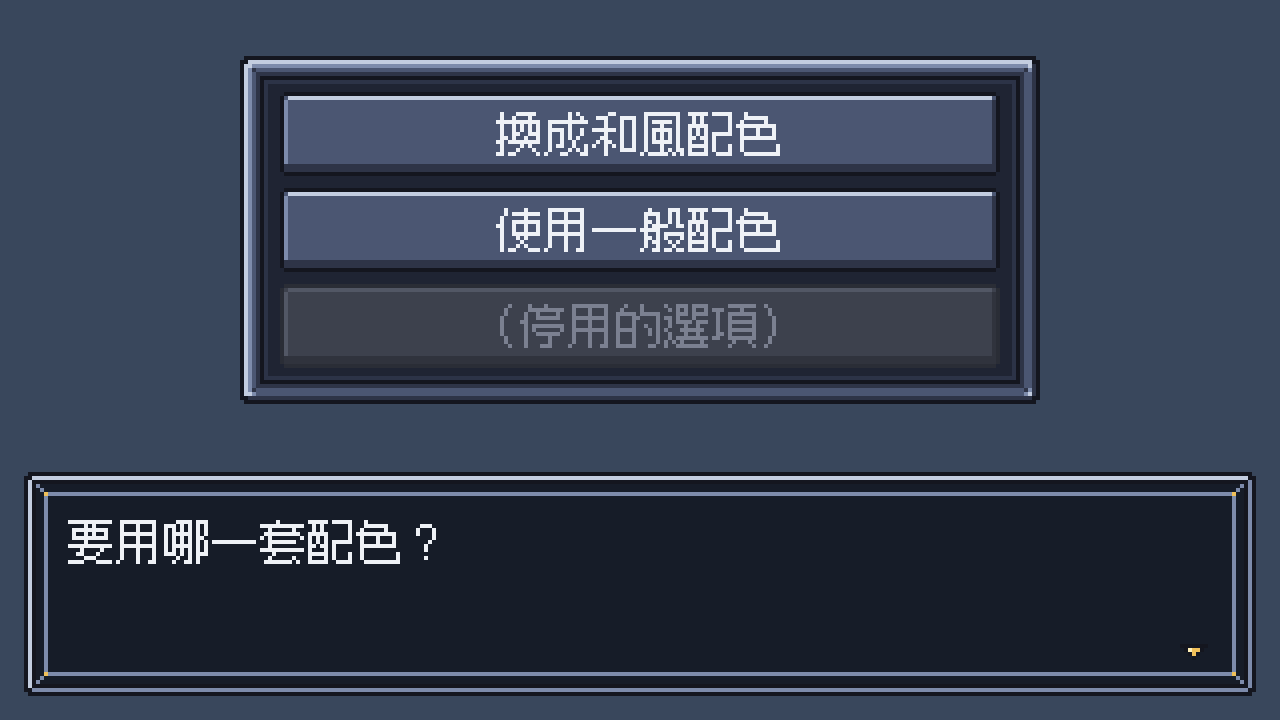
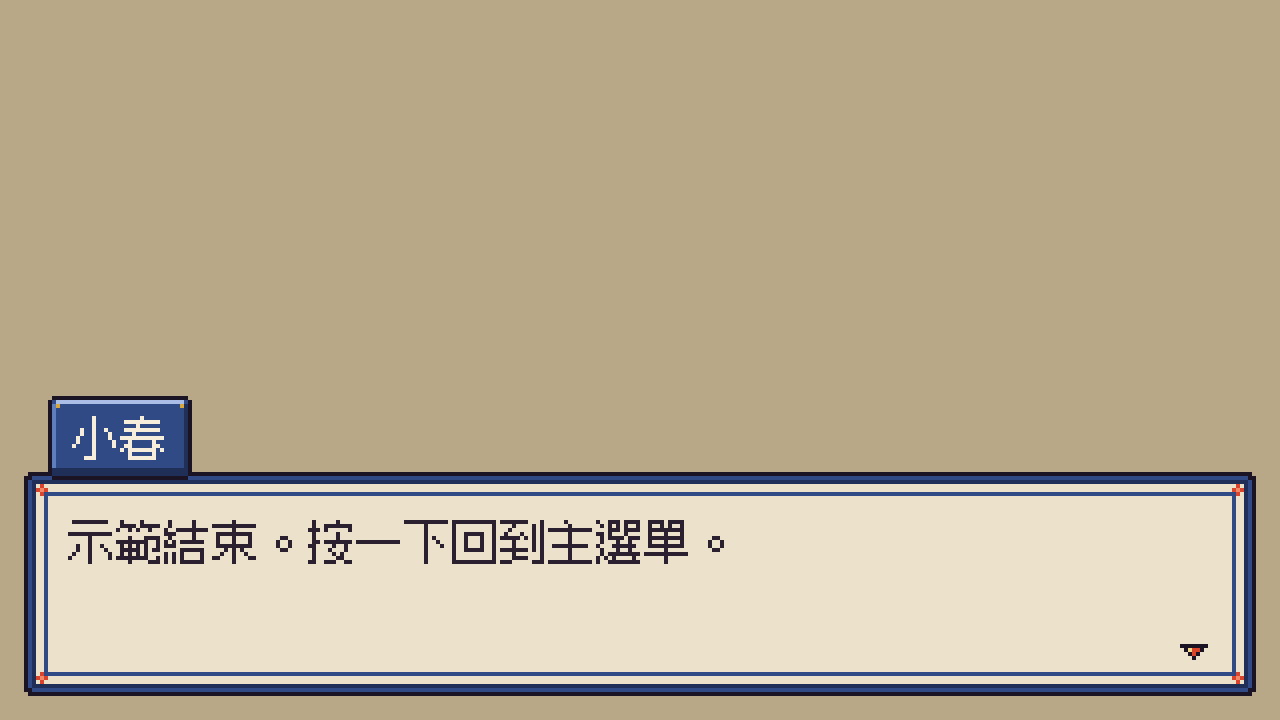
- Ren'Py example project (8.5.3): copy pixelui.rpy into your game; pui_frame() builds 9-slice Frames from slices.json. Includes main menu, say, choice, confirm and notify screens.
- Pixel-font demo: subsets of Fusion Pixel Font 12px (SIL Open Font License 1.1), one Traditional Chinese and one Japanese version, with the OFL text and the upstream font licenses.
- tools/: the Python scripts that drew every image, plus scripts for the Godot themes, the 9-slice previews, font subsetting and a pixel-crispness check.
DRAWN BY CODE
All graphics are drawn programmatically by tools/draw_pixel_ui.py. Regenerate them yourself with python3 tools/draw_pixel_ui.py (needs Python 3 and Pillow). I re-ran it on the released files and got identical PNGs and slices.json. You can also change the colours in the script and rebuild.
SETUP
- Made for a 320×180 base resolution shown at integer scale (for example a 1280×720 window = 4x) with nearest-neighbor filtering. Both example projects are already set up this way.
- Godot: viewport stretch mode, integer scaling, Nearest texture filter, GL Compatibility. The fonts are imported without antialiasing or hinting; use size 12 or a multiple of 12.
- Ren'Py: gui.init(320, 180), a 1280×720 window and config.nearest_neighbor = True (see options.rpy). Ren'Py buttons have no "pressed" state, so the pressed image is used as the selected background.
TESTED ON (ONLY)
Linux only: Godot 4.3-stable (GL Compatibility) and Ren'Py 8.5.3 (lint and an automated test). Windows, macOS, mobile and web exports have not been tested. In Ren'Py, only the native 320×180 setup above has been tested.
KNOWN LIMITATIONS
- Godot: the first time you open or import the project, the console may print errors about the theme referring to textures or fonts that are not imported yet. Open (or import) the project once more and they are gone.
- The fonts are a small subset of 661 characters: ASCII, Latin-1, kana, full-width punctuation and only the 82 kanji / hanzi used in the demos. They are enough for the demo only. For your own game text, re-subset the full official Fusion Pixel Font with tools/subset_fonts.py (needs fontTools), or use the full font.
- This is a sample: one window style plus the parts listed above. There are no sliders, scroll bars, gauges or icons.
LICENSE (summary; LICENSE.md in the zip is the full text)
- You may use the images, themes and code in your own games and other works, free or commercial, of any genre or rating.
- You may modify, recolour, crop and rescale them, and ship them inside your released game or work (packed or as loose files).
- Not allowed: selling, reselling, re-uploading or redistributing the kit or its assets by themselves, or as part of another asset pack, UI kit, template or tool, modified or not; claiming the original assets as your own.
- Credit is appreciated but not required.
- The fonts are licensed under the SIL Open Font License 1.1, not under this license.
- Provided "as is", without warranty of any kind.
AI DISCLOSURE
All graphics are drawn programmatically by the scripts in tools/ (no generative image model was used). The drawing scripts, code and text were written with AI assistance.
FULL VERSION
A paid full version is in preparation. What would you like it to include? Please tell me in the comments. Thanks for trying the sample!
Download: PixelUIKit_Sample_v1.0.zip (about 0.2 MB, 136 files).
────────────────────────
像素 UI 套件 — 免費試用版
給 Godot 4 與 Ren'Py 使用的像素風 UI 套件免費試用版。所有圖都是程式繪製,九宮格(9-slice)數據已經量好,並附繁體中文/日文像素字型示範。
內容
- 8 種 UI 圖 × 2 套配色(Neutral 一般、Wafu 和風):視窗框、按鈕 4 種狀態(一般/滑過/按下/停用)、焦點框、對話框、翻頁箭頭。
- 1x 原尺寸 PNG(正式素材),另附 2x、4x 最近鄰放大預覽與九宮格伸縮示意圖。
- 九宮格數據 assets/slices.json:每張圖的固定邊框、文字內距與 expand,順序為 [左, 上, 右, 下],不用自己切圖。README 裡也有同一張表。
- Godot 4 Theme:theme_neutral.tres、theme_wafu.tres(StyleBoxTexture),含 DialogueBox、LabelTitle、LabelDialogue、ButtonJA 等型別變化。放在一個 Godot 4.3 小專案裡,附可切換配色與語言的示範場景。
- Ren'Py 範例專案(8.5.3):把 pixelui.rpy 複製到你的遊戲即可使用,pui_frame() 會依 slices.json 建立九宮格 Frame。附主選單、對話、選項、確認、通知畫面。
- 像素字型示範:Fusion Pixel Font 12px 子集(SIL Open Font License 1.1),繁中版與日文版各一,附 OFL 全文與上游字型授權。
- tools/:繪製全部圖像的 Python 腳本,以及產生 Godot Theme、九宮格示意圖、字型子集化與像素清晰度檢查的腳本。
程式繪製
所有圖像都由 tools/draw_pixel_ui.py 以程式繪製。你可以用 python3 tools/draw_pixel_ui.py 自己重新產生(需要 Python 3 與 Pillow)。我用發佈的檔案重跑過,產生的 PNG 與 slices.json 和原檔完全相同。也可以在腳本裡改顏色後重新產生。
設定方式
- 以 320×180 為基準解析度,用整數倍放大顯示(例如 1280×720 視窗=4 倍),並使用最近鄰濾鏡。兩個範例專案都已經這樣設定好。
- Godot:viewport 伸縮模式、整數倍縮放、Nearest 貼圖濾鏡、GL Compatibility。字型匯入時關閉反鋸齒與 hinting,字級請用 12 或 12 的倍數。
- Ren'Py:gui.init(320, 180)、1280×720 視窗、config.nearest_neighbor = True(見 options.rpy)。Ren'Py 的按鈕沒有「按下」狀態,所以按下圖用在選中狀態的背景。
測試環境(只有這些)
只在 Linux 上測試:Godot 4.3-stable(GL Compatibility)與 Ren'Py 8.5.3(lint 與自動測試)。Windows、macOS、行動裝置與網頁匯出都沒有測試。Ren'Py 只測過上述 320×180 原尺寸設定。
已知限制
- Godot:第一次開啟或匯入專案時,主控台可能會出現「主題引用了尚未匯入的貼圖或字型」的錯誤。再開啟(或再匯入)一次就會消失。
- 字型只是 661 字的小子集:ASCII、Latin-1、假名、全形標點,以及示範用到的 82 個漢字,只夠示範使用。遊戲正式文字請用 tools/subset_fonts.py(需要 fontTools)從官方完整版 Fusion Pixel Font 重新子集化,或直接使用完整字型。
- 這是試用版:只有一種視窗樣式和上面列出的元件,沒有滑桿、捲軸、量表或圖示。
授權(摘要,完整條文見 zip 內的 LICENSE.md)
- 可以在你自己的遊戲與其他作品中使用這些圖、主題與程式碼,免費或商業皆可,不限類型與分級。
- 可以修改、改色、裁切、縮放,並作為作品的一部分隨作品發佈(打包或散檔皆可)。
- 不可以:單獨(或放進其他素材包、UI 套件、範本、工具中)販售、轉售、重新上傳或再散佈本套件或其素材,無論是否修改;宣稱原始素材為你所創作。
- 署名歡迎,但非必要。
- 字型依 SIL Open Font License 1.1 授權,不適用本授權。
- 依「現狀」提供,不附任何擔保。
AI 揭露
所有圖像都由 tools/ 裡的腳本以程式繪製(未使用生成式圖像模型)。繪圖腳本、程式碼與文字為 AI 輔助撰寫。
完整版
付費完整版準備中。你希望完整版有哪些內容?歡迎在留言區告訴我。感謝試用!
下載:PixelUIKit_Sample_v1.0.zip(約 0.2 MB,136 個檔案)。
────────────────────────
ピクセルUIキット — サンプル(無料)
Godot 4 と Ren'Py で使えるピクセルアート UI キットの無料サンプルです。画像はすべてコードで描画、9スライスの数値は計測済み、繁体字中国語/日本語のドットフォント表示例も付いています。
内容
- UI 画像 8 種 × 2 パレット(Neutral、和風の Wafu):ウィンドウ枠、ボタン 4 状態(通常/ホバー/押下/無効)、フォーカス枠、会話ウィンドウ、ページ送り矢印。
- 等倍(1x)PNG(本番用素材)に加え、2x・4x のニアレストネイバー拡大プレビューと 9スライスの伸縮見本。
- 9スライスの数値 assets/slices.json:各画像の固定枠・文字の内側余白・expand を [左, 上, 右, 下] の順で収録。自分で切り分ける必要はありません。README にも同じ表があります。
- Godot 4 Theme:theme_neutral.tres、theme_wafu.tres(StyleBoxTexture)。DialogueBox、LabelTitle、LabelDialogue、ButtonJA などの型バリエーション付き。パレットと言語を切り替えられるデモシーン入りの小さな Godot 4.3 プロジェクトに入っています。
- Ren'Py サンプルプロジェクト(8.5.3):pixelui.rpy を自分のゲームにコピーして使えます。pui_frame() が slices.json から 9スライスの Frame を作ります。メインメニュー、セリフ、選択肢、確認、通知の各スクリーン付き。
- ドットフォント表示例:Fusion Pixel Font 12px のサブセット(SIL Open Font License 1.1)。繁体字中国語版と日本語版の 2 つ、OFL 全文と上流フォントのライセンス付き。
- tools/:全画像を描いた Python スクリプトと、Godot Theme・9スライス見本の生成、フォントのサブセット化、ドットのくっきり度チェック用スクリプト。
コードで描画
画像はすべて tools/draw_pixel_ui.py がプログラムで描画しています。python3 tools/draw_pixel_ui.py でご自身でも再生成できます(Python 3 と Pillow が必要)。配布ファイルで実行し直したところ、PNG と slices.json は元のファイルと同一でした。スクリプト内の色を変えて作り直すこともできます。
設定
- 基準解像度 320×180 を整数倍で拡大表示(例:1280×720 ウィンドウ=4 倍)、ニアレストネイバーで表示する前提です。2 つのサンプルプロジェクトはこの設定済みです。
- Godot:viewport ストレッチ、整数倍スケール、テクスチャフィルタ Nearest、GL Compatibility。フォントはアンチエイリアスとヒンティングなしでインポート済み。サイズは 12 または 12 の倍数で使ってください。
- Ren'Py:gui.init(320, 180)、1280×720 ウィンドウ、config.nearest_neighbor = True(options.rpy 参照)。Ren'Py のボタンには「押下」状態がないため、押下画像は選択状態の背景に使っています。
動作確認環境(これのみ)
Linux のみ:Godot 4.3-stable(GL Compatibility)、Ren'Py 8.5.3(lint と自動テスト)。Windows、macOS、モバイル、Web 書き出しは未検証です。Ren'Py は上記の 320×180 等倍設定のみ確認しています。
既知の制限
- Godot:プロジェクトを初めて開く/インポートするとき、「テーマがまだインポートされていないテクスチャやフォントを参照している」というエラーがコンソールに出ることがあります。もう一度開く(またはインポートし直す)と消えます。
- フォントは 661 字の小さなサブセットです(ASCII、Latin-1、かな、全角記号、デモで使う漢字 82 字のみ)。デモ表示用の範囲です。ゲーム本文には tools/subset_fonts.py(fontTools が必要)で公式のフル版 Fusion Pixel Font から作り直すか、フルフォントを使ってください。
- サンプル版のため、ウィンドウのスタイルは 1 種類、パーツは上記のものだけです。スライダー、スクロールバー、ゲージ、アイコンは含みません。
ライセンス(要約。全文は zip 内の LICENSE.md)
- 画像・テーマ・コードを自作のゲームや作品に使用できます。無料・商用どちらも可、ジャンルや対象年齢区分を問いません。
- 改変・色変更・トリミング・拡大縮小し、作品の一部として同梱・配布できます(パック済み・個別ファイルどちらも可)。
- 禁止:本キットや素材そのものを単体で(または他の素材集・UI キット・テンプレート・ツールに含めて)販売・再販・再アップロード・再配布すること(改変の有無を問わず)、元素材を自作と偽ること。
- クレジット表記は歓迎しますが任意です。
- フォントには本ライセンスではなく SIL Open Font License 1.1 が適用されます。
- 現状のまま提供され、いかなる保証もありません。
AI 表記
画像はすべて tools/ 内のスクリプトでプログラム描画しています(画像生成モデルは使用していません)。描画スクリプト・コード・テキストは AI 支援により作成しています。
製品版について
有料の製品版を準備中です。どんな内容がほしいか、ぜひコメント欄で教えてください。お試しいただきありがとうございます!
ダウンロード:PixelUIKit_Sample_v1.0.zip(約 0.2 MB、136 ファイル)
Download
Click download now to get access to the following files:
Leave a comment
Log in with itch.io to leave a comment.